If you're a plumber, an electrician, a landscaper, a mobile detailer, or run any business that drives to the customer instead of the other way around, you've probably noticed that most Local SEO advice doesn't quite fit you. It's written for businesses with a storefront — a shop someone can walk into, a sign above a door, foot traffic. You don't have any of that, and yet you're still expected to compete for the exact same "near me" searches as the business down the street with a physical location.
The good news is that a Service Area Business (SAB) can absolutely win at Local SEO. But it takes a slightly different Local SEO Strategy than the standard advice, because Google itself treats service area businesses differently from storefronts — in how they're set up on Google Business Profile, how they go through Google Verification, and in some cases, how they show up in Google Search Results. This guide covers Local SEO for Service Area Businesses from the ground up, with the specific adjustments that actually apply to a business without a walk-in location.
What Is a Service Area Business, and Why Does It Matter for SEO?
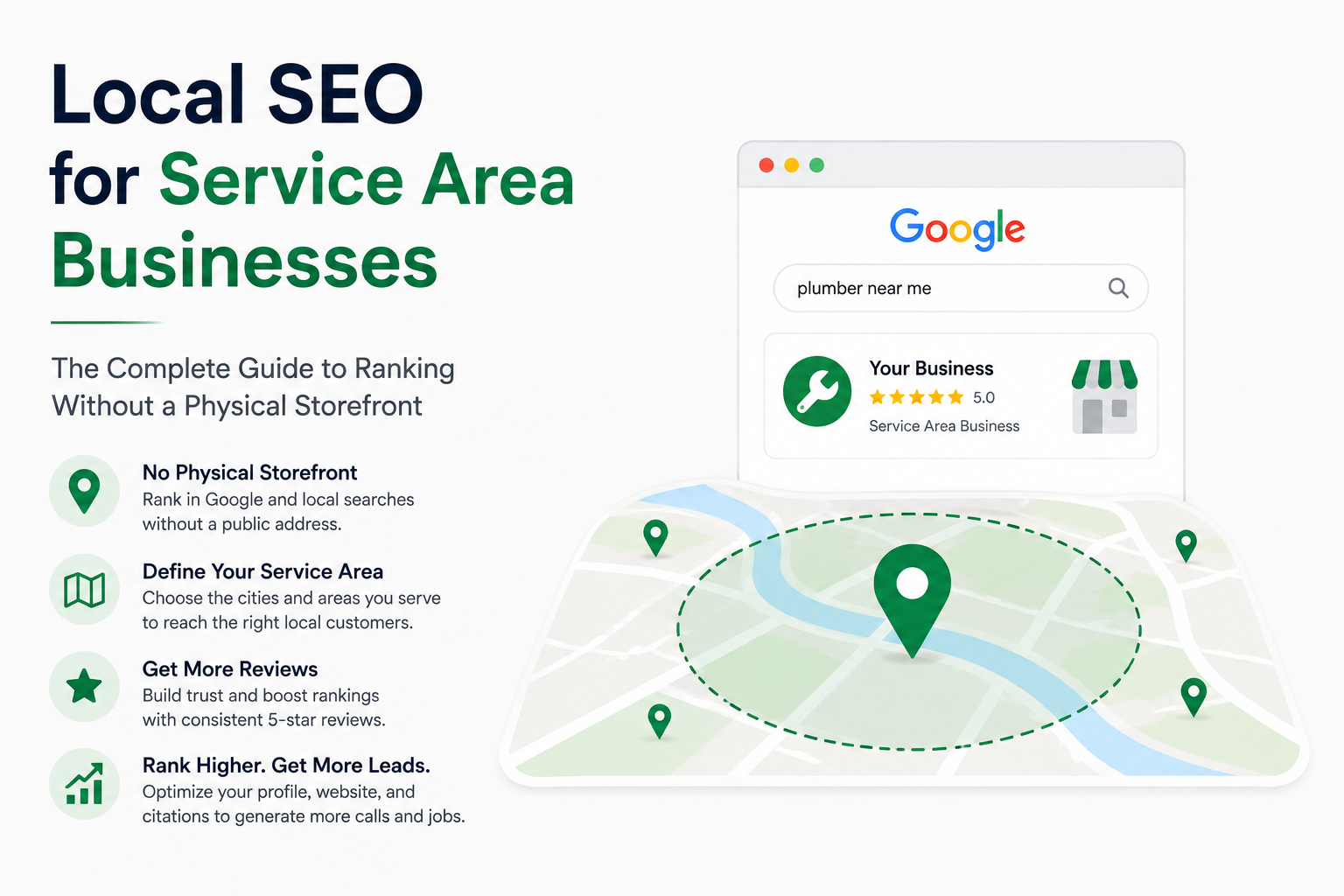
A Service Area Business — Google's official term is "SAB" — is any Mobile Service Business or Home Service Business that travels to customers rather than serving them at a fixed address: plumbers, HVAC technicians, roofers, cleaning services, mobile pet groomers, tutors who travel to homes, and countless other Location-Based Service Businesses.
This matters for Service Area Business SEO because Google's Local Search Ranking system was originally built around physical locations. Service area businesses have had to be fit into that system with some adjustments — you can hide your address, define a Service Radius instead, and in some cases you're excluded from certain features storefronts get access to. Understanding these differences is the starting point for any real Service Area Business Marketing plan, because a strategy copied directly from a retail store's playbook will miss half of what actually matters here.
Step 1: Set Up Your Google Business Profile Correctly for a Service Area Business
Your Service Area Business Google Business Profile is still the foundation of Local SEO — that part doesn't change. What changes is how you configure it.
When setting up or editing your profile through Google Business Profile Manager, you'll be asked whether customers visit your business at your address. For most service area businesses, the answer is no, and this is where you'll hide your street address from public view and define your Service Area Coverage instead. Google still requires you to enter a real address privately as part of Google Verification — you're not required to disclose it publicly, but you do need a legitimate location behind the listing.
A few Google Business Profile Optimization details that matter specifically for Service Area Business Google Maps SEO:
- Set your Service Area by city or postal code, not by drawing an arbitrarily large radius. Google recommends keeping this realistic — generally within about a two-hour drive of your base Service Locations for most service businesses, though this varies by industry.
- Don't inflate your Service Areas to try to capture more searches. An oversized service area is one of the more common mistakes businesses make, and it tends to hurt Geographic Relevance rather than help it, since Google has less confidence you can genuinely serve an area that large.
- Choose your Google Business Profile Categories with real precision. A plumber should select "Plumber," not "Contractor" — the more specific and accurate the category, the more Google trusts the relevance of your profile for the searches that actually matter to you.
- List every offering in Google Business Profile Services, with a real description for each. This is one of the sections Google Search is increasingly good at matching directly to specific searches, so leaving it thin is leaving visibility on the table.
Step 2: Build Service Area Pages That Actually Rank
This is where service area businesses often go wrong. It's tempting to build one generic "Service Areas" page listing twenty cities in a bulleted list and call it done. That approach rarely ranks for anything on Google Search, because there's no real Local Content behind it — just a list of place names with no substance for Google to evaluate.
Instead, build a dedicated Service Area Page — sometimes called a Location Page, City Landing Page, or Local Landing Page — for each city or region you genuinely serve, and give each one real content. For example, a Houston-based HVAC company shouldn't just list "Houston, Sugar Land, Katy, The Woodlands" in a footer and move on — each of those Service Area Pages should have:
- A description of the specific services you offer in that area, written as Unique Local Content rather than copy-pasted with the city name swapped.
- Localized Content relevant to that specific area — typical response times, any local regulations or considerations relevant to your industry, nearby landmarks or neighborhoods you commonly service (in Houston, that might mean referencing specific neighborhoods like The Heights, Midtown, or Katy rather than just the metro area as a whole).
- Reviews or testimonials from customers in that specific city, where you have them.
- A clear call to action and contact method specific to that page.
- Local schema markup identifying the service and the Service Area served.
If you're wondering how to improve Local Search Visibility for a specific city without a physical presence there, a well-built, genuinely unique Service Area Page is usually the single highest-leverage piece of Local Content you can build — far more effective than trying to stretch your Google Business Profile's service radius to cover it instead.
Step 3: Prioritize Which Areas Get a Dedicated Page
Not every town within your Service Area Coverage deserves its own Location Page. Building thin, low-effort City Pages for every zip code you technically could serve tends to backfire — it dilutes your Website Architecture with weak content and can actually hurt your overall Local Search Rankings rather than help them.
A more sustainable Local SEO Campaign for service area businesses:
- Start with the cities or regions where you already get the most calls or jobs, based on real Local Keyword Research and actual demand. For a Houston-based business, that's often Houston itself plus the highest-demand surrounding suburbs — Sugar Land, Katy, The Woodlands, Pearland, or Pasadena, depending on where your actual job history shows demand.
- Add areas with clear Local Search Intent for your services, even if you haven't done much work there yet.
- Skip areas with minimal realistic demand, even if they're technically within your driving range.
- Expand gradually as you gather real reviews and job history in each new area, rather than launching dozens of pages simultaneously with no substance behind them.
Step 4: Handle NAP Consistency Without a Public Address
Name, Address, Phone Number — commonly shortened to NAP — is core Business Data and a foundational Local Ranking Factor, but it gets slightly more complicated for a service area business that isn't showing a public address.
Here's how to handle NAP Consistency:
- Keep a consistent Business Name and Business Phone Number across your website, Google Business Profile, and every Business Listing or citation, even though your Business Address stays hidden from public view on most of them.
- For Online Directories that require an address field, use the same private address you used for Google Verification — consistency behind the scenes still matters, since Google and other platforms can still reference this Business Data even when it's not publicly displayed.
- If you operate from a home office, consider whether a registered business address (through a local coworking space, a PO box service that supports business registration, or similar) makes sense for consistency and privacy, rather than repeatedly changing how your address is handled across different Business Directories.
Step 5: Build Citations Designed for Service Area Businesses
Local Citations still matter for Service Area Business Local SEO, but a few adjustments help with Citation Building and Citation Management:
- Look for Industry Directories relevant to your specific trade — HVAC-specific directories, home service marketplaces, licensing and certification bodies — rather than only general Local Business Directories.
- Make sure each Directory Listing reflects your Service Areas appropriately, not just a single city, since some directories allow you to list multiple service regions.
- Keep your category and business description consistent across every citation, the same way you would across your Google Business Profile Categories.
Step 6: Reviews Matter Even More for Service Area Businesses
Without a physical storefront for customers to associate with your brand, Google Reviews often carry extra weight in building trust — both with potential customers and as a Local Ranking Factor. Someone deciding whether to let a stranger into their home for a repair is relying heavily on social proof, more so than someone simply walking into a retail store.
A few practices that matter specifically here:
- Ask for a review immediately after completing a job, while the experience is still fresh — this is one of the most effective habits for any Service Area Business SEO strategy.
- Encourage customers to mention the specific service and, where natural, the city or neighborhood in their review. This isn't something you can script or require, but it happens organically often enough to help reinforce Geographic Relevance for the areas you serve.
- Respond to every review, particularly negative ones, directly within your Google Business Profile Performance dashboard. For a business built on trust in someone's home or property, a thoughtful, professional response to a complaint often matters more than it would for a retail business.
Step 7: Structure Your Website Around Services and Areas Together
Many service area businesses build their Website Architecture around either Service Pages or City Pages, but rarely both together — and that's a missed opportunity. The strongest Local Website Structure typically combines the two: dedicated Service Pages for each core offering, dedicated Service Area Pages for each priority region, and where it makes sense, combined Service + City Pages targeting a specific service in a specific city ("Emergency Plumbing in [City]") for your highest-priority combinations.
This doesn't mean building a Location-Based Landing Page for every possible service-and-city combination — that leads right back into the thin content problem covered earlier. Reserve combined pages for your highest-demand services in your highest-priority areas, and let your broader Service Pages and Service Area Pages cover everything else. A Houston-based plumbing company, for instance, might build a dedicated combined page for "Emergency Plumbing in Houston" — its single highest-demand service in its home city — while relying on standard service area pages for lower-volume combinations like drain cleaning in smaller surrounding suburbs.
Strong Internal Linking between your Service Pages, City Pages, and homepage also matters here. Linking your Houston service area page to your relevant service pages (and vice versa) helps both users and Google Search understand how your Local Content Strategy fits together as a connected system rather than a scattered collection of pages.
Step 8: Track What's Actually Working
Once your Google Business Profile, Service Area Pages, and citations are in place, tracking performance tells you where to invest further:
- Monitor Google Business Profile Performance data — calls, direction requests, and website clicks — broken out where possible by which searches drove them.
- Track your Google Search Ranking and position in the Google Local Pack (also called the Google Maps Pack) for your priority "[service] + [city]" search terms specifically, not just your business name or a generic industry term.
- Watch which Service Area Pages are actually generating calls or form submissions, and which ones might need stronger content or simply don't have enough real Local Search Intent behind them to justify continued investment.
Common Mistakes Service Area Businesses Make
A few patterns show up repeatedly across Service Area Business Marketing efforts:
- Setting an unrealistically large Service Radius to try to capture more searches, which tends to reduce Geographic Relevance rather than expand reach.
- Building thin, duplicate Service Area Pages for every technically-reachable city instead of focusing on areas with real Local Search Intent.
- Choosing a vague primary category instead of the most specific, accurate option available in Google Business Profile Categories.
- Leaving the Services section incomplete, missing out on searches that match a specific offering rather than a general one.
- Inconsistent Business Data across directories, especially after a move or a change in Service Area Coverage.
- Neglecting Google Reviews, despite the outsized role trust plays for a business that works inside someone's home or on their property without a storefront to build that trust in person first.
Local SEO for Contractors: A Closer Look
Contractors — roofers, electricians, HVAC companies, general remodelers — make up a huge share of service area businesses, and they run into a few industry-specific patterns worth calling out separately.
Contractor searches on Google Search tend to split cleanly into two categories: urgent, high-intent "Near Me" Searches ("emergency electrician near me") and research-driven queries ("how much does a roof replacement cost"). Local SEO for contractors works best when it accounts for both, using real Local Keyword Targeting across each type. Your Google Business Profile and Service Area Pages should be built to win the urgent, high-intent searches — clear phone numbers, fast-loading pages, obvious calls to action. But supporting Local Content that answers the research-driven questions (pricing guides, "what to expect" explainers, licensing and permit information relevant to your area) builds the kind of topical authority that strengthens your entire site, including the service area pages sitting alongside it.
Licensing and certification also play a bigger role in contractor SEO than in many other service categories. Where relevant, display your license number, certifications, and insurance information clearly on both your website and your Google Business Profile description — this isn't just a trust signal for customers, it's often a genuine differentiator in a category where unlicensed or uninsured competitors are common enough that customers are actively screening for it.
Combining Service Area SEO With Paid Local Ads
Organic Local SEO and Google Local Services Ads or Google Ads aren't competing strategies — for many service area businesses, they work best run together. Local Services Ads and paid campaigns can fill the gap while your organic Service Area Pages are still building authority, and they can also validate which "[service] + [city]" combinations are actually generating calls before you invest heavily in a dedicated organic page for that combination.
A practical approach: use paid campaigns to test demand in new service areas, and once a city or service combination proves it drives consistent calls, invest in building it out as a fully optimized organic Service Area Page. This turns your paid data into a roadmap for where your Local SEO Strategy will pay off fastest, rather than guessing which areas deserve dedicated pages.
How Google's Local Pack Works for Service Area Businesses
It's worth understanding exactly what you're competing for. When someone searches for a local service, Google Search typically shows a Google Local Pack — sometimes called the Google Maps Pack — featuring a small set of local results with a map, before the standard list of organic website links appears below it. Ranking in this pack is often more valuable than ranking in Google Search Results further down the page, since it captures the most visible, highest-intent traffic.
For a service area business, earning a spot in the Google Local Pack depends on the same three pillars Google uses for storefronts — relevance, distance, and prominence — but distance is calculated slightly differently, since Google is estimating how well your defined Service Area covers the searcher's location rather than measuring distance from a public storefront. This is exactly why an accurate, realistic Service Area Coverage setting matters so much: get it wrong, and you either miss out on Local Pack visibility in cities you do serve, or you show up for cities you genuinely can't serve well, which tends to hurt performance across the board.